Passing store procedure result to another store procedure as parameter
-- First Stored ProcedureCREATE PROCEDURE SquareSP@MyFirstParam INT
AS
DECLARE @MyFirstParamSquare INT
SELECT @MyFirstParamSquare = @MyFirstParam*@MyFirstParam-- Additional CodeRETURN (@MyFirstParamSquare)GO
Monday, April 8, 2013

sugar crm api using c# (Consuming soap service)
Hi *.*,
From last one month i was on air.fully after sugar crm api.my job was to create UI on .NET by consuming there api.As i get into the api i realized there no working sample or anything they providing for .net.Using custom class output for service some really stupid stuff.Now i remember a comment abt this crm in sourceforge.net
Create a class library project [sample name i used sugarCRMCL]. build the solution first.
Right click on project file and click on add service reference >> Click on advanced

>> add web reference

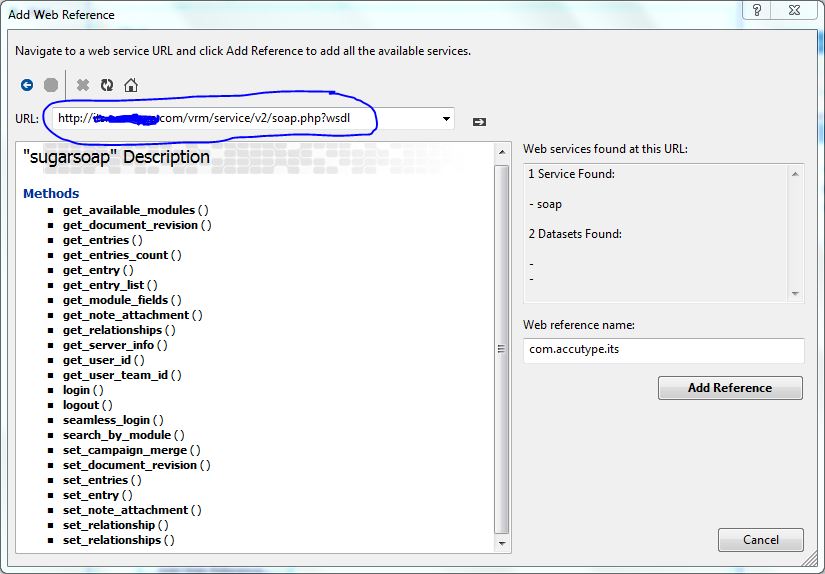
Click on add reference. Build your solution once and get the dll file from bin >>debug folder.
Now create new asp.net project environment. add that dll as reference to the bin folder.

On next day lets go with Login module :)
From last one month i was on air.fully after sugar crm api.my job was to create UI on .NET by consuming there api.As i get into the api i realized there no working sample or anything they providing for .net.Using custom class output for service some really stupid stuff.Now i remember a comment abt this crm in sourceforge.net
very little support & stability has been present in the open source version - very disappointingIts really unfortunate!!!!! but my client need that. :( Anyway i completed the project with lot of effort and pain. Even in my first project i didn't have this much mental load.Here i'm posting some of the basic steps.
Create a class library project [sample name i used sugarCRMCL]. build the solution first.
Right click on project file and click on add service reference >> Click on advanced
>> add web reference
Add the service url at the text-box and hit enter key
Click on add reference. Build your solution once and get the dll file from bin >>debug folder.
Now create new asp.net project environment. add that dll as reference to the bin folder.
On next day lets go with Login module :)
Wednesday, March 13, 2013
Disable Cut copy and Paste on a textbox
Disable Cut copy and Paste on a textbox
If u had any trouble just ask, Happy to help u :)
Stay Tune...
Have a nice day... 'N happy Coding :)
<asp:TextBox ID="TextBox3" runat="server"
onCopy=”return false” onDrag=”return false” onDrop=”return false” onPaste=”return false” oncut="return false">
</asp:TextBox>
If u had any trouble just ask, Happy to help u :)
Stay Tune...
Have a nice day... 'N happy Coding :)
Subscribe to:
Posts (Atom)